
Can I let Issue Tracker to set due date of new tickets based on my specified days ahead?
Yes, there is a dedicated feature in Issue tracker to set due date of new tickets based on your specified days ahead.
Follow the steps:
1. Go to Issue Tracker ribbon or toolbar > My Option > My Preference. And under ‘Due Date for new tickets’ section, you will find these three options:
Assign Current Date/Time,
Schedule day(s) ahead and
None
2. Choose ‘Schedule day(s) ahead’ Option.
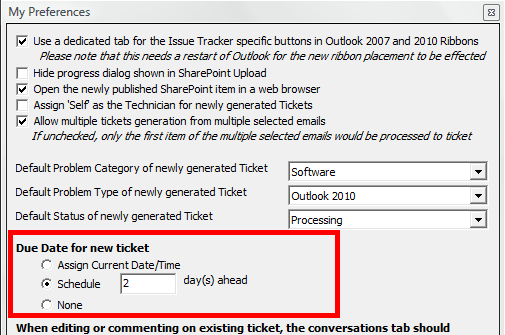
3. Enter the number of days you want to set the due date forward.
4. And save the setting.
Now, select an email and raise a ticket. In the ‘ticket form’ you will notice that the specified due date will be scheduled to 2 days ahead from the current date in the Due Date section.