
PDF to PDF-A Converter

Convert PDF to PDF-A compliant documents for long-term preservation, in bulk.

Windows app to quickly convert PDF files to PDF/A documents, that are compliant to the latest ISO standards designed to preserve electronic documents for the long term, regardless of future technological changes.

Available for a fully functional 30 days trial.

Product Summary

  • Convert your PDF files to PDF/A documents, in bulk, in a click.
  • Add digital signatures for added security.
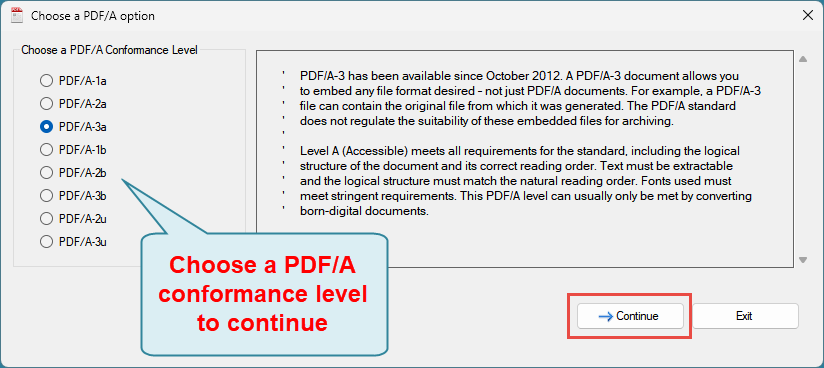
  • Supports the following PDF/A conformance levels:
    PDF/A-1a, PDF/A-1b, PDF/A-2a, PDF/A-2b, PDF/A-3a, PDF/A-3b, PDF/A-2u, PDF/A-3u
  • Generate PDF/A compliant documents that will retain the readability well into the future, against software changes.
  • Ensure the authenticity of your converted PDF/A documents by being difficult to modify and by providing document security (such as digital signatures).
  • Exists as an Windows App requiring a simple install. Local processing translates to no security risks or data breaches for your confidential and sensitive documents.
  • All processing performed offline and locally. No Internet connection required. Ideal for closed systems.
  • No more waiting to upload your PDF files to cloud service, or to download the generated documents.
  • No requirements to have Microsoft Office, Adobe Acrobat or any other dependencies installed. 

How It Works?

Regular PDF documents can contain external dependencies — linked fonts, embedded media, or references to outside resources — that may become unavailable over time. PDF/A eliminates this risk. Through PDF/A conversion, your documents become completely self-contained and device independent, ensuring these remain readable for long-term archiving and regulatory submissions.
 
Therefore, converting your regular PDF files to a PDF/A compliant documents makes sense for long-term preservation and archival. The adoption of PDF/A also ensures your business meet regulatory compliance.
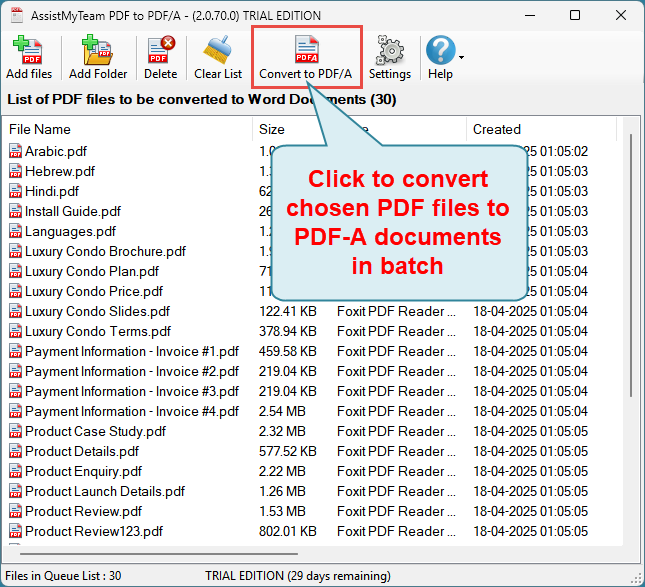
 
 
With the AssistMyTeam PDF to PDF/A converter app for Windows, you can convert your PDF files into PDF/A documents quickly, in bulk, in just a click. All you need to do is choose your PDF files or folders from your computer or network drive, to add them the queue list, before clicking ‘Convert to PDF/A’ button from the toolbar. And then choose a PDF/A conformance format that is appropriate for your requirement.
 
 
Having your documents in PDF/A format guarantees complete, accurate, and unchanged document records for decades. Banks, libraries, and government bodies that need reliable long-term storage rely on it heavily. Legal institutions mandate PDF/A for contracts and court documents because the format guarantees integrity regardless of future software changes.

Which conformance PDF/A level to use?

The ideal PDF/A conformance level depends on your needs, but PDF/A-2b is widely recommended as the best default for general long-term archiving. It embeds all necessary fonts and colors while allowing modern features like image compression and transparency.
 
Below is a general guidance of selecting an optimal tier for your specific use case:
 

Level B (Basic) – The Universal Standard

Suited for: Standard, long-term archiving of scanned documents, text files, and general corporate records.
Benefit: Focuses strictly on visual preservation. It ensures the document looks exactly the same when opened in the future.
Versions: Available in PDF/A-1b, PDF/A-2b, and PDF/A-3b.
 

Level U (Unicode) – The Searchable Standard

Suited for: General document archives where you need to be able to search for text or copy-paste content.
Benefit: Same as Level B, but forces Unicode mapping for all text. It ensures words can be found but does not maintain document reading structure.
Versions: Available in PDF/A-2u and PDF/A-3u (Level U doesn’t exist for PDF/A-1).
 

Level A (Accessible) – The Compliance Standard

Suited for: Government submissions, legal filings, and meeting accessibility mandates (like Section 508).
Benefit: The highest and strictest standard. It requires Level U, plus logical structural tagging and reading order, making it readable by screen readers for the visually impaired.
Versions: Available in PDF/A-1a and PDF/A-2a.